


(and the internal workings of the Tile Rendering Engine)
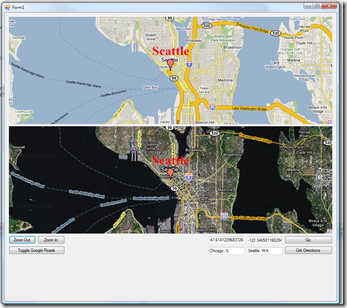
This morning, I got an email from one of the users of the Tiled Maps library. He pointed out that although it was easy to place Bitmap overlays at a position on the map, he couldnt figure out how to draw text at that position. His approach was to draw text on a Bitmap and then draw that Bitmap onto the map. The problem he was running into, however, was having a proper transparent background on that Bitmap (Windows Mobile does not support an alpha channel). Although it is possible to do a masked blit in Windows Mobile, this method of drawing text onto a map is not ideal.
If one examines the internals of the Tiled Map Client, you will find that overlays that appear on the map actually have a very flexible abstraction layer around them. The TiledMapSession itself has no internal knowledge of the overlay renderering implementation, in that it does not actually perform the drawing. It is only concerned about the Width and Height, so it can perform proper layout to let the rendering engine (IMapRenderer) to draw the content at the proper location. This is how the Tiled Map Client is flexible enough to perform both 2D and 3D rendering:
/// <summary> /// IMapRenderer provides the methods necessary for a TiledMapSession /// to draw tiles to compose the map, as well as the other content /// that may appear on the map. /// </summary> public interface IMapRenderer { /// <summary> /// Get a IMapDrawable from a stream that contains a bitmap. /// </summary> /// <param name="session">The map session requesting the bitmap</param> /// <param name="stream">The input stream</param> /// <returns>The resultant bitmap</returns> IMapDrawable GetBitmapFromStream(TiledMapSession session, Stream stream); /// <summary> /// Given a IMapDrawable, draw its contents. /// </summary> /// <param name="drawable">The IMapDrawable to be drawn.</param> /// <param name="destRect">The destination rectangle of the drawable.</param> /// <param name="sourceRect">The source rectangle of the drawable.</param> void Draw(IMapDrawable drawable, Rectangle destRect, Rectangle sourceRect); /// <summary> /// Draw a filled rectangle on the map. /// </summary> /// <param name="color">The fill color.</param> /// <param name="rect">The destination rectangle.</param> void FillRectangle(Color color, Rectangle rect); /// <summary> /// Draw a line strip on the map. /// </summary> /// <param name="lineWidth">The width of the line stripe.</param> /// <param name="color">The line strip color.</param> /// <param name="points">The points which compose the line strip.</param> void DrawLines(float lineWidth, Color color, Point[] points); } /// <summary> /// IMapDrawable is the interface used by the Tiled Map Client to represent content /// onto a IMapRenderer. /// IMapDrawable is generally tied to an implementation of IMapRenderer, /// which is responsible for internally representing and rendering the drawable. /// </summary> public interface IMapDrawable : IDisposable { /// <summary> /// The width of the drawable content. /// </summary> int Width { get; } /// <summary> /// The height of the drawable content. /// </summary> int Height { get; } }
So, how do we go from drawing a bitmap to drawing text? The standard/normal implementation and usage of an IMapRenderer is the GraphicsRenderer. The GraphicsRenderer is what facilitates rendering of a TiledMapSession to a System.Drawing.Graphics instance. Lets take a look at its implementation of Draw:
public void Draw(IMapDrawable drawable, Rectangle destRect, Rectangle sourceRect) { IGraphicsDrawable graphicsDrawable = drawable as IGraphicsDrawable; graphicsDrawable.Draw(Graphics, destRect, sourceRect); }
As you can see, it casts the IMapDrawable to an IGraphicsDrawable and calls its implementation of Draw, passing it the Graphics object:
/// <summary> /// IGraphicsDrawable is a type of IMapDrawable that can draw to a /// System.Drawing.Graphics instance. /// </summary> public interface IGraphicsDrawable : IMapDrawable { void Draw(Graphics graphics, Rectangle destRect, Rectangle sourceRect); }
There are two provided implementations of IGraphicsDrawable: WinCEImagingBitmap, which uses the Imaging API to draw bitmaps that contain alpha, and StandardBitmap, which draws a standard System.Drawing.Bitmap. So what we need, is a third implementation, which I called TextMapDrawable. TextMapDrawable will implement IGraphicsDrawable and use Graphics.DrawString to draw text onto the Graphics object.
Heres my implementation of TextMapDrawable:
public class TextMapDrawable : IGraphicsDrawable { static Bitmap myMeasureBitmap = new Bitmap(1, 1, PixelFormat.Format16bppRgb565); static Graphics myMeasureGraphics = Graphics.FromImage(myMeasureBitmap); public float MaxWidth { get; set; } public float MaxHeight { get; set; } Brush myBrush; public Brush Brush { get { return myBrush; } set { myBrush = value; } } bool myDirty = true; string myText; public string Text { get { return myText; } set { myText = value; myDirty = true; } } Font myFont; public Font Font { get { return myFont; } set { myDirty = true; myFont = value; } } #region IGraphicsBitmap Members public void Draw(Graphics graphics, Rectangle destRect, Rectangle sourceRect) { // just ignore source rect, doesnt mean anything in this context. if (CalculateDimensions() && myBrush != null) graphics.DrawString(myText, myFont, myBrush, destRect.X, destRect.Y); } #endregion bool CalculateDimensions() { bool valid = !string.IsNullOrEmpty(myText) && myFont != null; if (myDirty) { myDirty = false; if (valid) { SizeF size = myMeasureGraphics.MeasureString(myText, myFont); myWidth = (int)Math.Ceiling(size.Width); myHeight = (int)Math.Ceiling(size.Height); } else { myWidth = 0; myHeight = 0; } } return valid; } #region IMapBitmap Members int myWidth; public int Width { get { CalculateDimensions(); return myWidth; } } int myHeight; public int Height { get { CalculateDimensions(); return myHeight; } } #endregion #region IDisposable Members public void Dispose() { } #endregion }
As you can see, it took only 38 lines of code (according to Visual Studios Code Metrics) to allow drawing of text to the map! I have also updated the Tiled Map Client source for those interested in these changes.
Go to link for download

All in all, development on Klaxon has given me some great insight into how power states affect program execution. One of the changes I am making to the newest version of Klaxon is to turn the devices video off when the user hits snooze.
Since the earliest versions of Klaxon, I have been using the SystemIdleTimerReset call to prevent the device from going to sleep. This behavior is necessary because the application needs to continue running to pick up sensor events. However, using SystemIdleTimerReset has the unintended effect of leaving the display on: it should be turned off so as not to drain the battery or have a distracting bright light on in the room while the user is trying to sleep. So I did some searching to see if there was a way to explicitly turn off the video, but allow program execution to continue. The behavior I wanted is similar to how Windows Media Player can turn off the video but the songs keep playing, and the device does not go to sleep until Windows Media Player is stopped.
It turns out that Windows Mobile has several video power states, which are described quite nicely in an MSDN article. I ended up wrapping these native power management calls into a bow tied package for usage in C# for your reusing pleasure:
using System;
using System.Runtime.InteropServices;

namespace WindowsMobile.Utilities
{
 public enum VideoPowerState
 {
 VideoPowerOn = 1,
 VideoPowerStandBy,
 VideoPowerSuspend,
 VideoPowerOff
 };

 public static class Device
 {
 const int SETPOWERMANAGEMENT = 6147;
 const int GETPOWERMANAGEMENT = 6148;

 [DllImport("coredll")]
 extern static IntPtr GetDC(IntPtr hwnd);

 [DllImport("coredll")]
 extern static int ExtEscape(IntPtr hdc, int nEscape, int cbInput, ref VideoPowerManagement vpm, int zero, IntPtr empty);

 [DllImport("coredll")]
 extern static int ExtEscape(IntPtr hdc, int nEscape, int zero, IntPtr empty, int cbOutput, ref VideoPowerManagement outData);

 struct VideoPowerManagement
 {
 public int Length;
 public int DPMSVersion;
 public VideoPowerState PowerState;
 }

 public static VideoPowerState VideoPowerState
 {
 get
 {
 IntPtr hdc = GetDC(IntPtr.Zero);
 VideoPowerManagement ret = new VideoPowerManagement();
 ExtEscape(hdc, GETPOWERMANAGEMENT, 0, IntPtr.Zero, 12, ref ret);
 return ret.PowerState;
 }
 set
 {
 IntPtr hdc = GetDC(IntPtr.Zero);
 VideoPowerManagement vpm = new VideoPowerManagement();
 vpm.Length = 12;
 vpm.DPMSVersion = 1;
 vpm.PowerState = value;
 ExtEscape(hdc, SETPOWERMANAGEMENT, vpm.Length, ref vpm, 0, IntPtr.Zero);
 }
 }
 }
}
Usage:
Just get or set the Device.VideoPowerState property to do whatever you need!
Go to link for download

Go to link for download

Nama Driver | Driver | Download | Size |
Toshiba Service Station Utility | Utility | Download | 12.7Mb |
Realtek Wireless LAN Driver | WiFi | Download | 18.2Mb |
Atheros Wireless LAN Driver | WiFi | Download | 21Mb |
Toshiba Assistent | Utility | Download | 4Mb |
Toshiba Bulletin Board | Utility | Download | 73Mb |
Toshiba HDD/SSD Alert | Utility | Download | 36.6Mb |
Toshiba Value Added Package | HotKey | Download | 42Mb |
Realtek Card Reader Driver | Card Reader | Download | 12Mb |
ConfigFree Koneksi Utility | Utility | Download | 41Mb |
Intel mobile Display Driver | VGA | Download | 26Mb |
Intel Chipset SW Instalation Utility | Chipset | Download | 4.5Mb |
HDMI Control Manager | HDMI | Download | 6.3Mb |
ATI Radeon Graphics Driver | VGA | Download | 111Mb |
Bluetooth Stack for Windows 7 | Bluetooth | Download | 75Mb |
Web Camera Application | Go to link Download
Read more »
Go to link for download
Thursday, May 4, 2017Internet Download Manager 6 25 Build 15 Final With Crack Free DownloadInternet Download Manager 6 25 Build 15 Final With Crack Free DownloadInternet Download Manager 6.25 Build 15 Final With Crack FreeInternet Download Manager 6.25 Build 15 Final is a download management application that can be used only for the Microsoft Windows operating system.Internet Download Manager 6.25 Build 15 Final , download to multiple sequences to be performed faster download operation. IDM and programs, Internet Explorer, Opera, Netscape, Mozilla Firefox, Google Chrome works. Spyware or adware is no report that contains IDM, have been released. Internet Download Manager 6.25 Build 12 Final can not download movies that you see on websites. When playing movies from the Internet automatically, ie the name of the movie or sound Download this video on the page will appear when clicking on the video or audio to be loaded. With this software you can increase your download speed. Unlike other download managers and start downloading the files before they IDM pieces when downloading and depending on the speed of the Internet or … File into pieces and that this practice improves the download speed and download Download File will be the features of this software can be a simple, supports most popular browsers, easy installation, the ability to continue downloading after disconnecting from the Internet, Zmanbdny downloads and more. Internet Download Manager 6.25 Build 15 Final New Features
How Install & Registered Internet Download Manager 6.25 Build 15 Final With Crack
 Download Links!!!! Password:pccrack.net Download Here Setup Internet Download Manager 6.25 Build 15 Final Crack + Patch + Keygen Only Crack + Patch + Keygen Download Links!!!! Download Here tag: serial number idm terbaru, serial number idm gratis, serial number idm 6.23, serial number idm 6.11 build 8 free, serial number idm 6.11 build 7 yahoo answer, serial number idm 6.11 build 7 free download, serial number idm, kode idm, internet download manager registration, internet download manager free download with serial number, idm serial number gratis, idm serial number free download full versions, idm serial number free download file rar, idm serial number free download 6.19 crack full, idm serial number free download, idm serial number download free, idm serial number download, idm serial number crack, idm serial number 6.12 free, idm serial number 6.11 free download, idm serial number 6.11 free, idm serial number 6.11 build 7 , idm serial number 6.07 free download, idm serial number 2016, idm serial number 2015 free download full versions, idm serial number 2015 free, idm serial number 2015, idm serial number, idm registration serial number, idm free download with patch, idm free download plus crack, idm free download full version with serial number 2012, idm free download full version with serial number, idm free download full version, idm free download full, idm free download for windows 7, idm free download crack, idm free download, idm crack version free download, idm crack patch, idm crack keygen, idm crack free download full version, idm crack bagas31, idm crack, free idm serial number for registration, free idm crack download, free download idm full crack terbaru, free download idm 6.08 full crack, download idm full crack tanpa registrasi, download idm full crack indowebster, download idm full crack gratis tanpa registrasi, download idm full crack gratis 2014, download idm full crack gratis, download idm crack gratis, download idm, download crack idm 6.25, cara register idm, cara mengisi serial number idm, cara mendaftar idm, cara download idm full crack gratis, cara crack idm, bagas31 idm, Go to link for download
Saturday, April 29, 2017Expense IQ Expense ManagerExpense IQ Expense ManagerOfficial Al Muqtashidah - Ya Rasulallah Abdul Qodir sholawat Langitan.mp4 Terbaru, Download Lagu Al Muqtashidah - Ya Rasulallah Abdul Qodir sholawat Langitan Lyrics. More Related Songs Download mp3 Al Muqtashidah - Ya Rasulallah Abdul Qodir sholawat Langitan (no Vocal) - Persembahan Untuk Kekasih.. ^_^ [readmore] We also have other in different categories. You can browse through the category and find your favorite. Or you can watch Download mp3 Al Muqtashidah - Ya Rasulallah Abdul Qodir sholawat Langitan (no Vocal) on Youtube { http://www.youtube.com/watch?v=OztLO8TL9SI } Credits - Video DMCA - Disclaimer Download : as (video) | as (video) | as (mp3) Go to link for download
Wednesday, April 26, 2017Download Internet Download Manager 6 18 Build 2 Final PcSoftGuruDownload Internet Download Manager 6 18 Build 2 Final PcSoftGuruHERE ARE THEM: Active applications Contact me personally: WeChat: ad0lfhitl3r Go to link for download
Monday, April 10, 2017Daily Expense Manager PRO Apk 1 11 DownloadDaily Expense Manager PRO Apk 1 11 DownloadVivaltorians , seems to be a long time no see you guys, Today I wanna share a another SystemUI Mod by Chocolat from Official Samsung Galaxy V . So lets start!  Screenshot Requirements:
Downloads: Chocolate UI How to install:
Congratulations , Now you have succesfully installed this SystemUI MOD on your Vivalto Device, Feel free to ask on comment section below, Like us on Facebook and see you in the next one ! Peace ! Credits:
*NOTE* Center clock in that Screenshot using Gravitybox Go to link for download
Wednesday, March 29, 2017ES File Explorer File Manager 3 0 2 Apk DownloadES File Explorer File Manager 3 0 2 Apk DownloadHello everyone long time no see, Today I got my examination break for a weeks , So I wanted to share with you guys a lot of new things for Galaxy V. So lets begin. According to the title on this post, This gonna be CWM Recovery for Galaxy V . But, we already have a CWM Recovery for our devices? Yup, Youre right, But this is a CWM Recovery for those user using a KST2015 Kernel Version. This CWM Recovery will fix for those user who trying to install this CWM Recovery and got a blank/white screen at the end of the result. NOTE : IF YOU NOT FACING ANY PROBLEMS WITH PREVIOUS VERSION OF CWM, YOU CAN KEEP USING IT.  Requirement :
Installing CWM :
Thats it you have succesfully installed CWM Recovery for KST 2015 kernel version on your Galaxy V . Thats all for this post. See you again :) Go to link for download
Subscribe to:
Posts (Atom)
|
 Or you can watch Download mp3 Al Muqtashidah - Ya Rasulallah Abdul Qodir sholawat Langitan (no Vocal) on Youtube { http://www.youtube.com/watch?v=OztLO8TL9SI }